Our Location
UNIT 1406A, 14/F, THE BELGIAN BANK BUILDING, NOS. 721-725 NATHAN ROAD, MONG KOK HONG KONG

UNIT 1406A, 14/F, THE BELGIAN BANK BUILDING, NOS. 721-725 NATHAN ROAD, MONG KOK HONG KONG

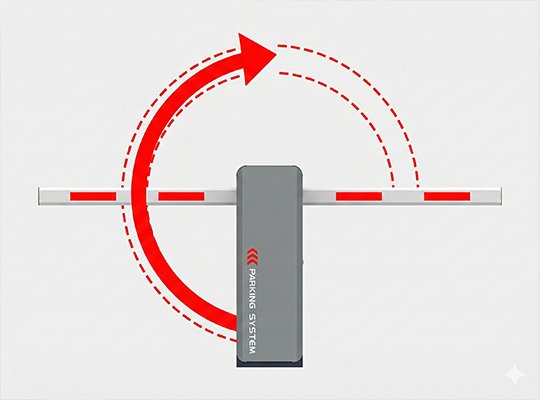
Introduction Are you reinstalling your barrier gate at a new location, or did you realize the default direction doesn’t fit your site layout? Don’t worry. Changing the direction of an ACCESS TECH DC Brushless Barrier Gate is a straightforward process that involves two main parts: a mechanical adjustment and a control system setting.
This guide summarizes the video tutorial to help you successfully switch your barrier gate from a left-fixed to a right-fixed orientation (or vice versa) in just a few minutes.
Before you begin, ensure you have the following tools ready:

⚠️ Important: Always disconnect the power supply before opening the chassis or touching any internal components to ensure your safety.
The first stage involves adjusting the physical mechanism so that the motor and spring work in the correct direction.
Step 1: Release the Spring Tension
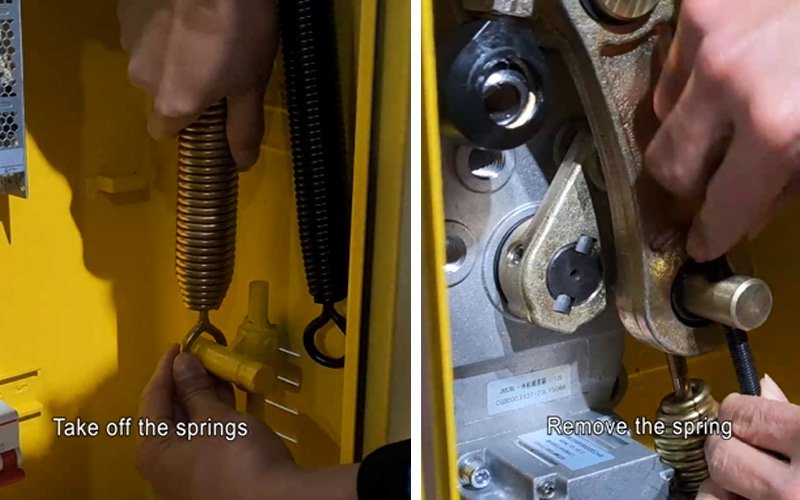
Step 2: Switch the Linkage Mechanism

Step 3: Reinstall the Spring on the Opposite Side
Once the mechanical adjustment is complete, you must update the control board settings to match the new direction. Follow these exact steps on the control panel:
Step 4: Access the Parameter Menu
Step 5: Locate the Direction Parameter
Step 6: Change the Direction Value
Step 7: Save and Exit
Step 8: Final Test Test the barrier gate using a remote or push button to ensure the boom opens and closes correctly according to the new orientation.
Congratulations! You have successfully reversed the direction of your ACCESS TECH barrier gate. By combining the mechanical swap of the spring and linkage with a simple software setting update, your gate is now ready for operation.
For a visual walkthrough of every step, be sure to watch our full video tutorial here:
If you found this guide helpful, make sure to subscribe to our channel for more technical tips and tutorials!


